RAD Email Security

RAD helps companies like yours secure email using a revolutionary cloud platform that instantly scans inbound, internal, and outbound emails to eliminate phishing, account takeover, and data leaks.

Let’s take a look at some common email security threats.
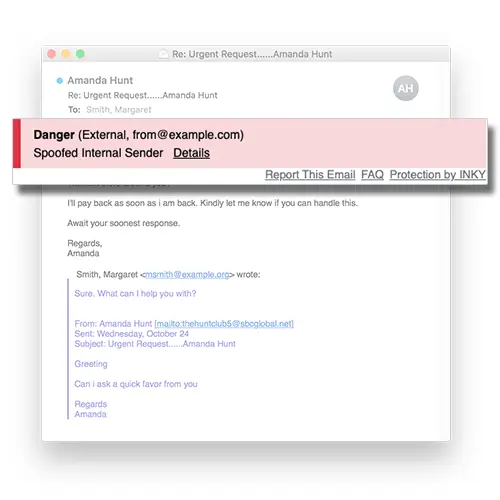
Sender Impersonation

Sender Impersonation is a clever attack where impostors either act under the identities of internal employees (oftentimes the CEO!) for financial gain. In a majority of cases, impersonation attempts occur with attackers emailing company employees from a fraudulent domain name that’s very close to the company’s domain. Usually, the criminal has used social engineering tactics to understand the business structure of an organization and coerced the employee into a financial transfer.

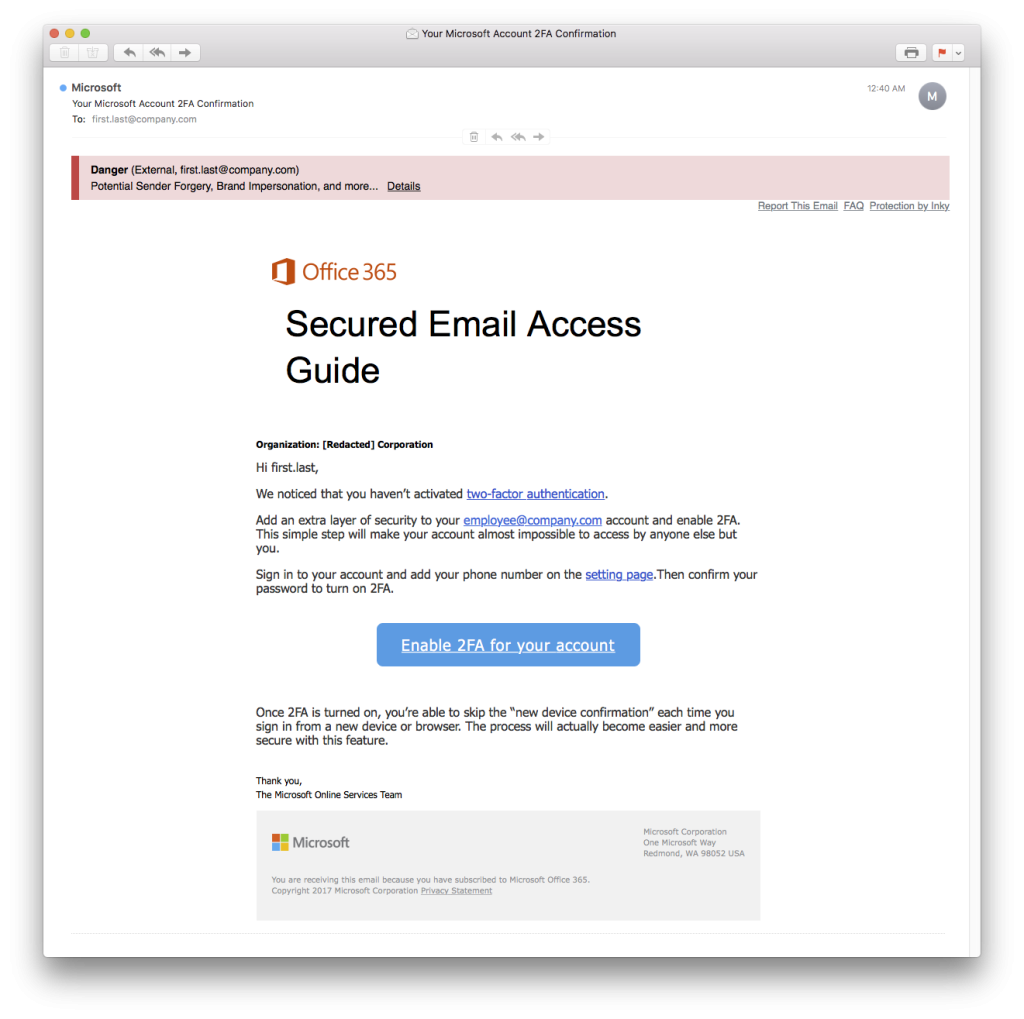
Brand Forgery

Brand forgery emails look like a legitimate email from a brand you know and trust– but it’s not really from that brand. Through good marketing, many companies have trained people to associate certain images or phrases with a given brand. Brand recognition helps sell products, but it also leaves users vulnerable to brand forgery attacks. By including branding from companies that users trust, phishers can make their emails look more authentic and trustworthy to their targets. As these phishing schemes become more sophisticated, Our advanced brand forgery detection plays an increasingly important role in phishing protection.
Ransomware and Malware

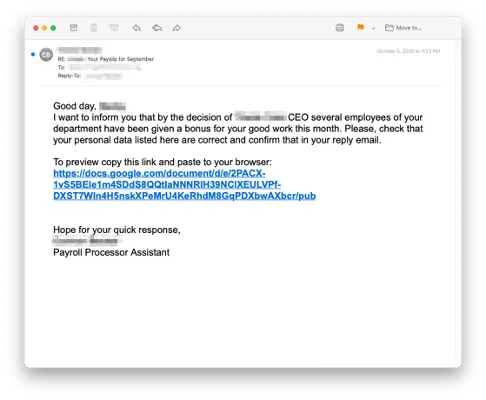
A particularly destructive tool hackers use to attack their targets is email that contains unsuspecting links or attachments to malware. They design phishing emails that set the recipient up for what is called ‘malware injection’. From there, the malware performs any number of tasks, including spreading itself throughout the network, data exfiltration, surveillance, and business disruption.

Other key RAD Email Security Features

Anti-Phishing Protection

RAD’s Email Security detects and blocks brand forgery attempts, and mitigates sender impersonation attacks. The Email Assistant helps employees make safer email decisions through a color-coded banner system.

Outbound Mail Protection

Outbound Mail Protection is designed to reduce data leaks by scanning all outgoing emails and enforcing corporate policies. Any rule violation will trigger a confirmation page so mistakes are caught before they are sent.

Internal Mail Protection

Internal Mail Protection protects internal email traffic from attacks that originate within the organization. RAD’s Email Security builds profiles of senders to block impersonation attempts and reduce risk. 

Email Encryption

RAD’s Email Security simplifies email encryption and increases user adoption so that sensitive data is protected from the time it leaves your inbox until the recipient reads it.

Mobile Email Security

RAD’s Email Security banners work exactly the same no matter what device users are reading emails. Fully functional across any mobile email apps, emails are flagged with a color-coded banner, and users can view threat details, and report emails from anywhere.

Get in touch to discuss your requirements

Frequently Asked Questions About Email Security

What is RAD Email Security

Email Security is an email protection product that uses sophisticated machine learning and artificial intelligence to analyze incoming messages for signs of phishing, spam, and other email-based threats.

Why do i see these banners at the top of my email?

The color-coded banners are inserted by our system to alert you of any possible threats in your emails. The banners also display the email sender’s address and mark if an email is internal (from someone in your organization) or external. If you see these banners, it means that your IT staff has deployed our email security stack and included you in the group of protected users.

What do the different banner colours mean?

A gray banner indicates that RAD Email Security did not find anything unusual or suspicious about the message. Even though the message was not classified as threatening, you should always check the displayed sender address and the source type to be sure it makes sense (e.g., an external webmail address for a message from a colleague may be cause for concern). A yellow banner indicates that RAD Email Security found something unusual about the email message. It is not necessarily phishing or dangerous but something you should be aware of. For example, a request for sensitive personal information should be given extra scrutiny. Mail that seems out of the ordinary or is spammy in some way may receive a yellow banner. A red banner indicates that RAD Email Security thinks the message is suspicious and likely to be phishing or dangerous in some other way. This includes brand impersonations (e.g., a fake “account alert” email from your IT department), blocked phishing URLs, or attempts to spoof mail to look like it came from an internal company account.

What should i do if i receive an email with a yellow banner?

Look carefully at who the mail is from and whether it is from someone you trust. Be especially careful about clicking any links in the body of the email or opening any attachments.

What should i do if i receive an email with a red banner? WHy did i receive it if it's considered dangerous?

In most cases, you can simply delete the message and move on. In many RAD's Email Security deployments, your IT staff, security team, or email administrator will configure your mail server to quarantine or delete “red-flagged” mail before it reaches your mailbox. In other cases, the mail will still be delivered with the banner telling you to be careful.

What does the "Report This Email" link do? How do i provide feedback on RAD's Email Security analysis?

If you think RAD's Email Security has made a wrong classification, or if you just want to confirm that RAD's Email Security got it correct, click the “Report This Email” link found in the bottom right corner of each banner. This will take you to a web form where you can indicate that the message is truly Safe, Spam, or Phishing. You can also provide a comment describing your assessment. This feedback is used to automatically improve our Email Security predictions in the future. Your submissions are also manually reviewed to improve the overall system and ensure RAD's Email Security provides the most accurate security possible.

Why do i see a RAD Email Security fence page when i click a link in an email?

Part of RAD's Email Security's protection is the ability to perform real-time checks on any links you click. If this feature is enabled, clicking on links in a yellow or red banner email will take you to a page reiterating that RAD's Email Security found the message to be unusual or suspicious. In some cases, a message that originally only had a gray banner contains a link that is later detected as a dangerous phishing URL. In that case, when you click the link, RAD's Email Security's real-time check will detect you clicked on a bad link, and you’ll be met with a blocker page alerting you of that fact.

What should i do if i have questions or comments about RAD Email Security?

Please contact your IT staff, security team, or email administrator who can pass your feedback along to the appropriate Email Security support person. They will be able to fine-tune your Email Security policies and settings to help make things work as smoothly as possible.